Understanding Kubernetes Services

Aspiring DevOps | Web Developer | Containerisation | myselfMohammedaArif | Graduate '19-'23
As we learned earlier, in production, we usually deploy a pod through a deployment. For each deployment, we create a service. Let's dive into what services are all about!🤔
Scenario Without Services
Imagine a developer or DevOps engineer deploys a pod as a deployment. This deployment creates a replica set, which in turn, creates pods. Let’s say we have three replicas of a pod for handling concurrent users. Without a service, each pod will have a unique IP address.
If one pod goes down, Kubernetes’ auto-healing capability ensures a new pod is created. However, this new pod will have a different IP address. This inconsistency can cause problems for users trying to access the application, as they would be using outdated IP addresses.
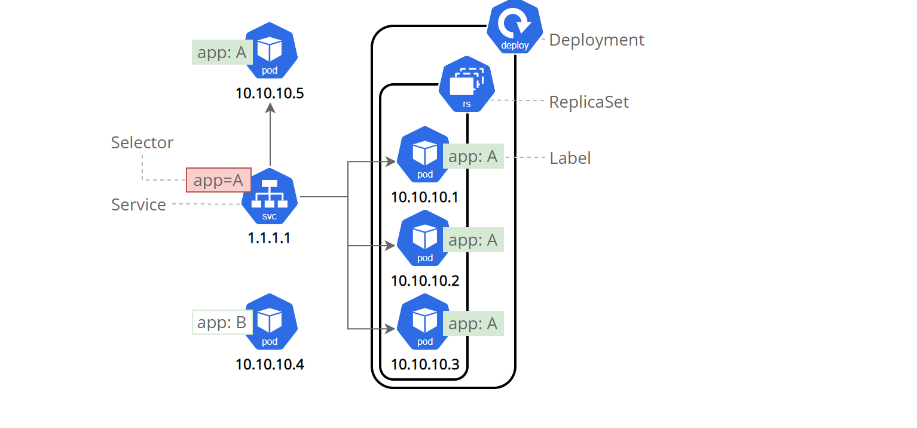
let understand this diagram
We have created three pods using a deployment. On top of the deployment, we create services ( it act as load balancer -->it use a companent in kubernetes called kube-proxy)
How Services Solve the Problem
Kubernetes services provide a stable endpoint that balances requests across multiple pods. Here's how they help:
Load Balancing: distribute incoming traffic across multiple pods, making sure no single pod gets too much traffic. This is important for handling high traffic smoothly.
Service Discovery:Instead of keeping track of each pod's IP address, services use labels and selectors. Each pod gets a label, and the service monitors these labels, making it easy to find pods even if their IP addresses change.
Exposing Services to the External World
Kubernetes services also let you share your applications with the outside world. There are different types of services:
ClusterIP: This is the default type and is only accessible within the cluster.
NodePort: This exposes the service on each node’s IP at a static port, making it accessible within your organization’s network.
LoadBalancer: Provided by cloud providers, this type exposes the service to the outside world using a public IP address.
Next, we will dive into practical demos to better understand Kubernetes services. Stay tuned!

